
+- T0rrentinvites - #1 To Buy, Trade, Sell Or Find Free Tracker Invites! (https://t0rrentinvites.com)
+-- Forum: Other Discussions (https://t0rrentinvites.com/forumdisplay.php?fid=30)
+--- Forum: General PC Chat And Help (https://t0rrentinvites.com/forumdisplay.php?fid=33)
+--- Thread: Windows could get haptic trackpad feedback for more interactions (/showthread.php?tid=11388)
Windows could get haptic trackpad feedback for more interactions - TheSeller - 11-11-2025
New options were spotted in the mouse menu that could add a little extra spice to the Windows Snap function and others.

Haptic trackpads are only in a tiny number of Windows laptops, most notably the newer Surface devices. But they’re pretty neat if you get a chance to try them out, enhancing the experience in the same way haptic feedback on phones does. According to some features spotted in a pre-release version of Windows, it’s coming to more interactions in the operating system.
PhantomofEarth, a tireless and spot-on investigator of Windows builds, spotted it hidden in the newest developer/beta build of Windows 11, 26220.7070. Though it’s hidden by default, they were able to explore a setting for “Haptic signals” under the main Mouse settings menu. “Feel subtle vibrations when you snap windows, align objects, and more” says the setting, along with a slider for the intensity.
PhantomofEarth, a tireless and spot-on investigator of Windows builds, spotted it hidden in the newest developer/beta build of Windows 11, 26220.7070. Though it’s hidden by default, they were able to explore a setting for “Haptic signals” under the main Mouse settings menu. “Feel subtle vibrations when you snap windows, align objects, and more” says the setting, along with a slider for the intensity.
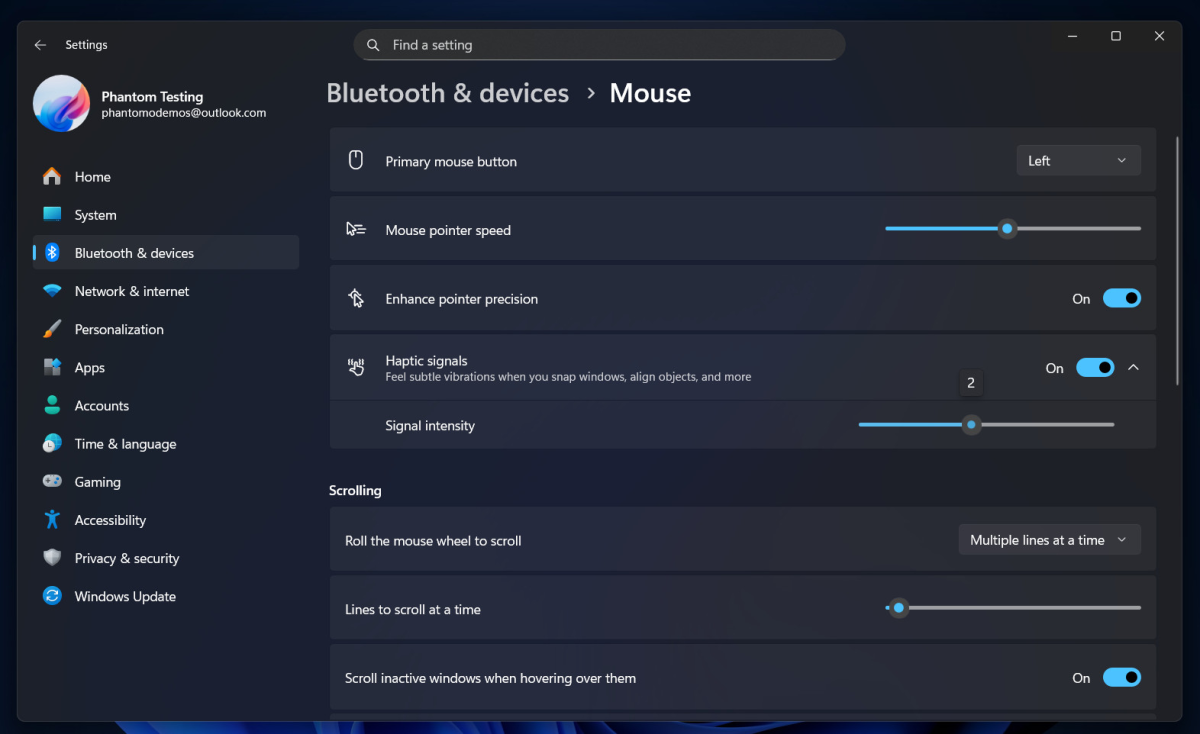
Presumably this will mean a little buzz of feedback when you use Windows’ Snap feature, the way to quickly set a specific window to take up half the screen, a quadrant, et cetera. (Incidentally, if you use this often, you simply must download PowerToys and use FancyZones to customize your layouts.) Similar user interface tricks are found on phones and tablets — I get something like this when I open side-by-side apps on an Android phone or tablet, for example.
Right now haptic feedback for Windows elements is pretty limited, though it’s expanding since Apple added it as a default on MacBooks, characteristically branded as “Force Touch.” But Logitech recently added haptic feedback to the brand new MX Master Mouse 4, so it looks like it’s definitely a trend. It’s not clear when or if this new option will make its way to general users, considering that it’s got to be a pretty low priority.
Right now haptic feedback for Windows elements is pretty limited, though it’s expanding since Apple added it as a default on MacBooks, characteristically branded as “Force Touch.” But Logitech recently added haptic feedback to the brand new MX Master Mouse 4, so it looks like it’s definitely a trend. It’s not clear when or if this new option will make its way to general users, considering that it’s got to be a pretty low priority.